Updated 2026-11-14: revised for emfor 0.4.0. Since 0.4.0, a member that is not an assigned checker makes its own check at least every third
interval(every fifth in 0.3.0) and starts a fast recheck run when its own check fails; peer messages are now encrypted. See the emfor 0.4.0 release notes.
1. What emfor is
emfor is an open-source health-check daemon that runs on every application host. It checks the backends of the services your applications use (TCP, HTTP, Nagios-style scripts, and plugins for redis, MySQL, PostgreSQL, LDAP and more) and writes which backends are healthy to an LMDB file on the same host. When an application needs a database server, it asks the client library for an address; the library reads the local file and, following the service’s balance setting, returns an answer such as 10.0.3.1:5432.
              checks over the network
  backends <------------------------------ emfor daemon ---------> DNS on 127.0.0.1
                                               |  writes
                                               v
                                     local LMDB state store
                                               |  reads
                                       client library
The key point of this design is that a lookup never touches the network. It takes about a microsecond and keeps working when other hosts or the network fail. Each host uses its own config and sees the backends from where it stands; there is no central server.
But “everyone looks for themselves” has a cost.
2. Three problems with checking alone
1. Failures are noticed slowly. A backend is marked unhealthy only after fall consecutive failed checks. With the defaults, interval = 2s and fall = 3, that is about 6 seconds. With twenty hosts in one data centre, every one of them spends those 6 seconds on its own, although they are all looking at the same broken backend.
2. What one host sees is not necessarily the truth. A failed check may mean the backend is really down, or only that this host’s network, firewall rules or load are the problem. The other way round, a host that can reach a backend does not prove that every host can. A single host cannot tell the difference.
3. The number of checks grows with the number of hosts. With N hosts each checking every backend, a backend answers N checks every interval. With enough hosts, the health checks themselves become a load on the backend.
Peer groups are designed for these three problems.
3. What a peer group does
The emfor daemons of one data centre (site) that list each other under [peers] in their config form a peer group. Members talk over signed UDP messages and do three things.
1. Failure reports: someone noticed, so I check right away
Every member sends a heartbeat every second, so everyone knows who is live. When a member sees a backend go from healthy to unhealthy, it tells every other member. The members that receive the report do not simply believe it: they recheck that backend at once, then every 200 ms, up to fall checks, instead of waiting for their next interval.
The result: once one member has noticed a failure, the others confirm it with their own checks and follow within about a second. A report is only a hint that it is time to look; it never changes a backend’s state by itself.
2. Majority vote: three assigned checkers vote
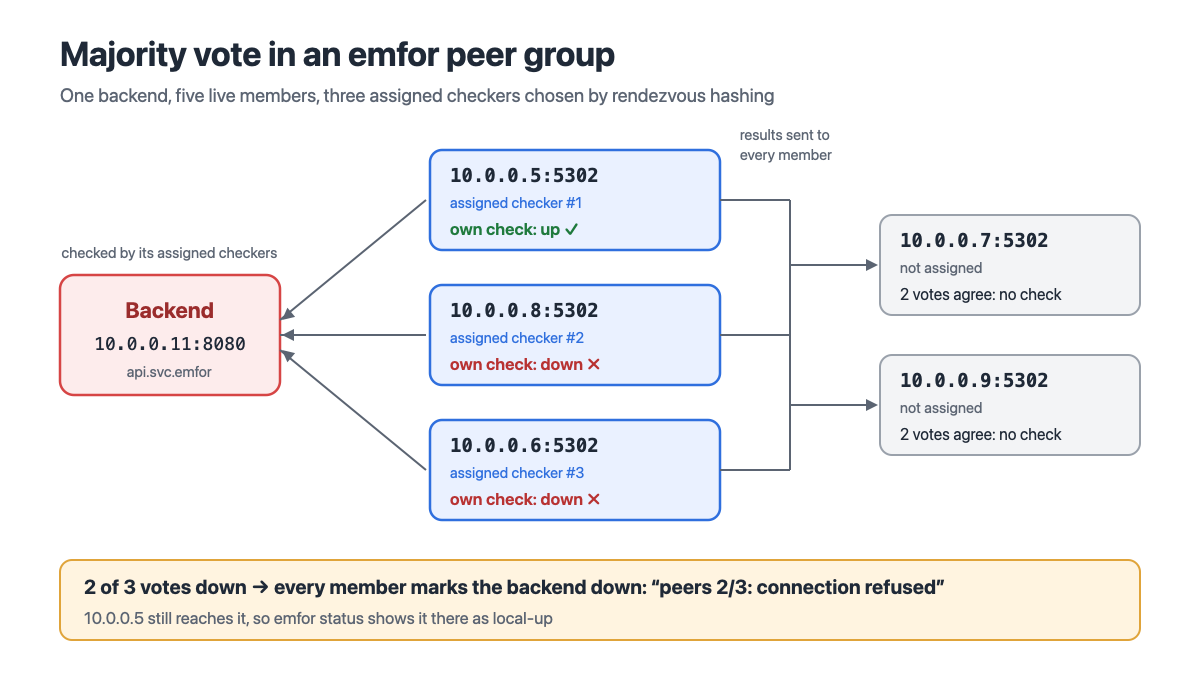
What does change the state is the vote. With at least three live members (this host included), every backend has three assigned checkers. They are chosen by rendezvous hashing: for each candidate member, compute
the first 4 bytes of MD5("<service name>/<backend>/<member address>")
and take the three largest values. Because every member uses the same formula on the same list of live members, everyone picks the same three without any coordination, and when a member joins or leaves, only a few backends get different assigned checkers.
After each of its own checks, an assigned checker sends its result (up or down) to the other members. After each of its own checks, every member counts the votes for that backend from its assigned checkers that are recent and come from a member with the same check definition:
| Votes | Result | Reason reads |
|---|---|---|
Two or more down | Down, even if this host’s own check passed | peers 2/3: connect: Connection refused |
Fewer than two down, own check failed | This host’s own result | local: connect: Connection refused |
| Fewer than three live members, or no vote | This host’s own result, unchanged | The original reason, no prefix |
The prefix tells an operator at a glance where a verdict came from: peers 2/3: is the group’s consensus, local: is a problem only this host sees. The latter deserves attention; it usually means something is wrong with this host’s own network or firewall.
The opposite case is visible too: a backend the group votes down while this host’s own check passes is marked local-up by emfor status and counted by emfor_peer_disagreements. “I can reach it, the others cannot” is often a sign of a network partition or of a firewall rule on the other hosts.
“The same check definition” matters as well. Each service’s check, check_options and timeout are hashed into a digest, and only members with the same digest have their votes counted. When two hosts check the same service differently, their results cannot be compared directly; emfor status then shows “check definition differs” as a reminder to make the configs match.
3. Split checks: fewer checks for those who are not assigned
With a vote in place, members that are not assigned checkers need not check every time. While two assigned checkers agree (two up or two down votes), a member that is not one of them takes the vote’s result and skips the check. It never lets go completely, though:
- it makes its own check at least every third
interval; - it checks every time while there are fewer than two agreeing votes;
- when its own check fails while the assigned checkers say up, it starts a fast recheck run (every 200 ms, up to
fallchecks), as after a peer’sdownreport; - after its own check fails, it checks every
intervalagain until a check passes; - when the vote says up but this host has not measured a latency yet, it checks once itself, so a backend is never declared healthy without a measurement.
With three assigned checkers and N members, a backend gets about
3 + (N − 3) / 3 checks
per interval instead of N. With 20 hosts, that drops from 20 checks per interval to about 8.7.
The price: a failure that only one host that is not an assigned checker can see (a routing problem that affects only that host, say) is noticed there only at its next own check plus the fast recheck run. Measured over 12 failures with interval = "2s" and fall = 3, that took 0.8 to 5.8 seconds, 3.3 seconds median; 0.3.0, which checked itself only every fifth interval and had no fast run here, took up to about 14 seconds. This is latency traded for fewer checks. emfor status marks such backends voted, so operators know which backends this host judges mostly by the vote.
4. Lines the design does not cross
With peer groups added, emfor’s original properties are unchanged:
- Lookups still read only the local store. What the group exchanges only affects how the daemon decides; the client library does not know the group exists, and a lookup gains no network round trip.
- Unreachable members mean a fall back to local judgement. When members stop or the network breaks, there are simply no votes, and the daemon goes back to deciding from its own checks, exactly as without a group.
- No master, and no spanning data centres. All members are equal, and assigned checkers come from a hash, so there is no election. A group is limited to one
site, because different data centres see different networks and should not vote for each other. - Messages are encrypted and protected against replay. Every message is encrypted with ChaCha20-Poly1305 under a key derived from a shared secret (0.3.0 only signed them with HMAC-SHA256 and sent them in the clear). The receiver checks that the sender’s address is a member and that the timestamp is within 5 seconds of its own clock, and rejects replayed old messages. The secret can be rotated without downtime: after a host sees its secret file change, it keeps sending with the old secret for 60 seconds and accepts it for 120 seconds.
5. Configuration
On every host of the data centre, add:
site = "dc1"                               # required with [peers]

[peers]
listen = "10.0.0.5:5302"                   # this host's address in the group
members = ["10.0.0.5:5302", "10.0.0.6:5302", "10.0.0.7:5302"]
secret_file = "/etc/emfor/peers.key"       # at least 32 bytes, mode 600 or 640
members lists every member, this host included; the same list can go on every host of the data centre, and only listen differs. The vote and the split need no settings of their own; they use each service’s existing interval.
Some services are not a good fit for a peer group, for example when the check result depends on the host by design. Individual services can stay out:
[services."local-cache.svc.emfor"]
check = "tcp"
backends = ["127.0.0.1:11211"]
peers = false
A service with peers = false sends no reports or results on this host, ignores the ones it receives, and always decides from its own checks; the other services stay in the group. Changing the setting only takes a reload, and the backends keep their state. The host announces the services it leaves out in its heartbeats (as short hashes of their names), and the other members then leave it out when choosing those services’ assigned checkers, so with enough live members their backends still have three assigned checkers that vote. Each host can therefore decide on its own which services to leave out. Peer groups and this announcement both came in emfor 0.3.0, so every member of a group reads it.
6. Seeing what the group does
emfor status shows the group under the daemon line:
peers: 4/4 live, checks 12/40 backends here
peers: check definition of api.svc.emfor differs at 10.0.0.6:5302
The first line shows which members are live and that, of the 40 backends shown, this host checks 12 itself every time (the rest are marked voted). emfor status --json also lists every backend’s assigned checkers:
"assigned_checkers": [
  {"service": "api.svc.emfor", "backend": "10.0.0.11:8080",
   "checkers": ["10.0.0.5:5302", "10.0.0.8:5302", "10.0.0.6:5302"]}
]
In Prometheus, emfor_peer_up shows member liveness, emfor_peer_messages_rejected_total the dropped messages by reason (auth for a different secret, stale for clock drift, sender for mismatched member lists), emfor_peer_disagreements the backends in disagreement, and emfor_peer_checks_skipped_total how many checks the split has saved.
7. Summary
A peer group does not turn emfor into a distributed system. It is closer to the daemons of one data centre nudging each other:
- when one host notices a failure, the others recheck and follow within about a second;
- three assigned checkers vote, telling “the backend is really down” apart from “only my host has a problem”;
- members that are not assigned checkers skip most checks thanks to the vote, so the checks a backend receives no longer grow linearly with the number of hosts.
Lookups still read only a local file and still finish within microseconds, and whatever happens to any member of the group, the worst case is a fall back to each host deciding on its own.
emfor’s source code, full manual and example configs are on GitHub: github.com/embark-systems/emfor.
💡 Technical collaboration and architecture consulting
Are your services struggling with inconsistent health checks, slow failure detection, or check traffic that weighs on your backends? We can help you assess your architecture and adopt the health-check and service-discovery approach that fits.