emfor is an open-source health-check daemon that runs on every application host. It checks the backends of the services your applications use and writes which ones are healthy into a local file; applications ask a client library which backend to connect to and get an answer in about a microsecond, without a network round trip.
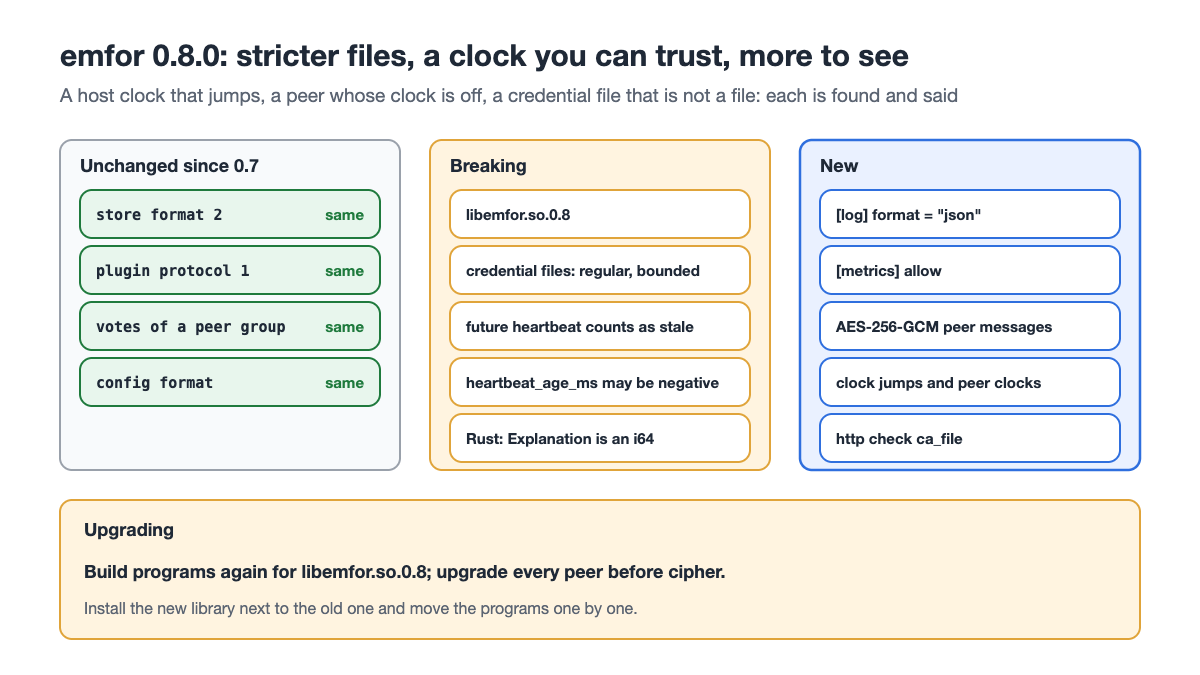
0.8.0 was released on 2026-11-25. The 0.7 releases were about what the daemon trusts; this one is about whether you can see it when something goes wrong. A host clock set back, a peer member whose clock is off, a member that never sends its results: before, each of these only made the answers quietly strange. Now emfor detects them and says so. The release also has several breaking changes; read section 1 before you upgrade.
0.8.0 is probably the last release that breaks compatibility. We expect the releases after it to fix small problems and nothing more: no new breaking changes to the config, the commands, status --json, the store, the client API, the metrics, the DNS answers or the plugin protocol. This is what we intend, not a promise: if a security fix cannot be done without a breaking change, we will make it and say so at the top of the changelog entry, under Breaking, as we always do.
1. Read this before upgrading
The store format (2) and the plugin protocol (1) are unchanged. These are the things to watch:
libemforislibemfor.so.0.8(it waslibemfor.so.0.7). A program linked against the C library has to be built again, and the Python, Perl, PHP and Go clients of this release load the new name. The old and the new library can sit side by side: install the new one, move the programs one by one, and remove the old file after the last one.- Credential files must be regular files of bounded size. A
password_file, a RADIUSsecret_file, atls_key_file, atls_cert_fileor aca_filethat is a FIFO, a device or a directory, or larger than the limit (64 KiB;tls_cert_fileandtls_key_file1 MiB;ca_file8 MiB), is refused now. A link to a regular file still works. Before, a path that pointed at a FIFO stopped the thread that read it. systemdLoadCredential, Docker secrets and Kubernetes secrets end up as regular files, so none of them is affected as far as we know; we did not try each. - A heartbeat in the future counts as stale. When the host clock is set back by more than
EMFOR_MAX_STALENESS(3 s by default) and the daemon then stops writing, clients no longer take the store for fresh until the clock catches up. A lookup then sees every backend as unknown: aclosedservice givesALL_DOWN(exit status 1 ofemfor lookup), anopenservice gives every backend, healthy or not. With a live daemon the clients see a stale store for up to about a second, until its next heartbeat.emfor statususes a fixed 3 s and exits with 1 in that case, where it exited with 0 before. heartbeat_age_mscan be negative inemfor status --jsonandemfor lookup --explain --json, when the heartbeat is later than the reader’s clock. A parser has to accept a negative number. In the Rust crateemfor-client,Explanation.heartbeat_age_msis ani64now (it was au64).- Upgrade every member of a peer group before setting
[peers] cipher = "aes-256-gcm": an earlier version countsEMP4asmalformed. - A config that uses a key added here (
[log] format,[peers] cipher,[metrics] allow, theca_fileof anhttpcheck) failsemfor check-configon an earlier version, so take it out before a downgrade.
2. Clock trouble is visible now
Four things in this release deal with clocks.
- The daemon logs a jump of the host clock. At each heartbeat (once a second) it compares how far the wall clock moved with how far a monotonic clock moved. When they differ by more than 2 seconds it writes a
warnline withevent=clock_jumped,direction(forwardorbackward) andjump_ms, andemfor_clock_jumps_totalcounts it. A busy or late tick moves both clocks alike and is not reported. At most one line is written every 10 seconds, but every jump is counted. The heartbeat, the store and the client’s staleness decision are the same. - A peer member whose clock is off is shown before its messages are dropped. From every message of a member that passes the checks, the daemon measures the member’s timestamp minus its own clock. When the last three messages are all at least 2 seconds off in one direction,
emfor statushas a linepeers: clock of <member> is <n.n> s behind this host(orahead of),emfor status --jsonhaspeers.clock_offsets, and the log has awarnand later aninfo. The new metricemfor_peer_clock_offset_seconds{peer}exists for every measured member. The 5-second limit, the votes and the protocol are unchanged. - A member that sends no results is shown. When a member is an assigned checker of a backend, is live and does not leave the service out, but sends no fresh result for it (it lacks the service or the backend, its check keeps giving
error, or its packets do not arrive), the other members report it after 10 seconds or 6 intervals of the service, whichever is longer.emfor statushas a linepeers: no results from <member> for <service> (<n> backends),--jsonhaspeers.silent_checkers, and there are the metricemfor_peer_silent_checkersand a log line. Votes and the wire format are unchanged. - Three small fixes. One: when a clock offset state ends because no measurement arrived for 10 s, the log no longer says
within limits again; it says the measurement is missing and the state is cleared, and keeps the old line for a member that is really back. Two:emfor statussays that the clock of this host differs from every member only when every member is off in the same direction; with members on both sides it lists them one by one. Three: the JSON log, below.
We measured the jump detection on FreeBSD 15.1 (an arm64 VM): 6 busy yes loops and a looping dd for 11 minutes (about 675 ticks) gave a largest difference of 1 ms and no line; setting the clock +30 s, -45 s and +15 s gave three counts and two lines (the -45 s step was counted but not logged, because it fell inside the 10-second period). The same load for 10 minutes in a Debian container on Linux 7.2 (arm64) also gave 1 ms; a container shares the host’s clock, so it was not stepped there. Not measured: x86-64, and a host that suspends and resumes. The 2-second threshold and the 10-second period are choices, not tuned values.
3. The log, /metrics and peer messages
- The log can be JSON. New
[log] format = "json"(default"text") writes one JSON object per line, with the fields of the event at the top level andtimestamp,level,targetandmessage. It is JSON once the daemon has started with it; the lines before that (plugin start, config errors, warnings about the config files) are text. The state change line gainsevent=backend_state_changed;event,service,backend,from,to,reason,timestampandlevelare stable fields now. - A reload logs what it changed. After an accepted reload the log has one line per difference (services and backends added, removed or changed,
drain, a changed check definition by digest only, peer group settings), at most 50 per reload and then one line for the rest, beforeconfig reloaded. The daemon also logs the SHA-256 of every config file it reads, at each start and reload. Check options and secrets are never logged. The log cannot say who changed a file; use auditd for that. - A peer secret rotation has a stable line. When the content of
[peers] secret_filechanges (no reload needed), the daemon logs oneinfoline withchange=peers_secret_rotatedandsecret_file=<path>. It never holds the secret or a hash of it. [metrics] allowlimits who can read/metrics. A list of networks ("10.0.0.0/8","fd00::/8"); a connection from any other source gets403 Forbidden. Loopback is not exempt onceallowis set. Withoutallownothing changes, except a warning at start and reload whenlistenhas a non-loopback address. A changedallowneeds a restart.httpchecks take aca_file. For a server whose certificate a private CA signed, pointca_fileat the CA’s PEM file instead of installing it system-wide or turning offtls_verify. Only that file is trusted, not the system’s CAs. A replaced file takes effect at the next check.- Peer messages can use AES-256-GCM (
EMP4). New[peers] cipher: the default"chacha20-poly1305"changes nothing;"aes-256-gcm"makes every member sendEMP4; it needsencrypt = trueand is reloadable. Chapter 13 has a FIPS section that is blunt about it: emfor has no FIPS mode, this is a different cipher, not a validated module. On one arm64 machine a datagram of 150 to 500 bytes took 0.7 to 1.5 microseconds to seal or open inEMP3and 0.8 to 1.0 inEMP4.tools/bench-peer-crypto.shrepeats it; not run on x86-64. emfor statusno longer calls an empty store a version problem. A store the daemon never wrote to (it exited at start because the DNS port was taken, for example) now saysstore is emptyand points at the log, instead ofstore format version (missing).
4. What the manual says now
Many items of this release changed only the manual, not the program, and each says what we actually ran and what we did not.
- A threat model: what emfor protects, which boundaries an attacker can reach (backends, plugins, DNS,
/metrics, the peer UDP port, local users), where each defense is and which gaps are open. It comes from reading the code, not from a penetration test. It records that the peers check the sender against the UDP source address only: one member that holds the secret cannot turn a backend down (2 of its 3 assigned checkers must say down); two colluding members can. - Vector. Chapter 14 has a section: the
prometheus_scrapesource for/metrics, and the JSON log through aremapwithparse_json!, from a file, from the journal or, on FreeBSD, through asedthat cuts the syslog prefix into thestdinsource.examples/vector/has the three configs, run with Vector 0.62.0 in docker. The FreeBSD 15.1 arm64 repository has no Vector package, so Vector itself was not run on FreeBSD. - SELinux and AppArmor. The rpm was run on Rocky Linux 9.9 (aarch64 VM,
targeted, enforcing): the daemon ran asunconfined_service_tand, withtcp,httpandexecchecks, DNS,/metrics, an encrypted peer group, the store and a reload, raised no AVC denial. The deb was run on Ubuntu 24.04 (arm64 VM, AppArmor enabled): no profile applies to the daemon and the kernel log has noapparmor="DENIED"line. We do not ship a policy module. x86-64 is untested. - Ping and SCTP. Chapter 6: the
execrecipes were run under the packaged unit on Rocky Linux 9.9 and Ubuntu 24.04. On Ubuntu thepingcheck failed for every backend untilnet.ipv4.ping_group_rangeincluded theemforgroup. We still do not plan a built-in ICMP or SCTP check. - HAProxy and 503. With two name servers that disagree and several backends on one IP (one host, several ports), HAProxy 3.4.8 answered a few requests with 503: all six runs of 400 requests had some (1 to 21 per run), while six runs with a separate IP per backend had none. FreeBSD 15.1 (HAProxy 3.4.4) shows the same; the 503 that 0.6.0 listed as unexplained there is this case. Nothing in emfor changed; the advice stays: one name server, and a separate IP per backend.
- How big the store gets.
tools/scale-test.shstarts up to 8,000tcpbackends in 80 services and reports the store size, memory, CPU and the time to switch. The rule from it: 6 KB per backend,map_sizeat least twice that; the default 64 MiB fits about 5,000 backends. - Several data centres, TLS for
/metrics, CPU cores. Chapter 11 says one peer group per data centre, each with its ownsite, members and secret, and why members of two sites do not belong in one group. Chapter 12 has “Metrics over TLS”:listenstays on loopback, nginx in front terminates TLS, Prometheus usestls_config(tried with nginx in a container; Prometheus, HAProxy and stunnel were not tried), and a way to keep emfor on some CPU cores withCPUAffinity=. - A fix to the SNMP trap script.
examples/snmp/emfor-snmp-trap.shsent nothing when a service went all down:emfor status --jsonexits 1 then, and the script treated every non-zero exit as a failure and stopped. It now stops only on exit 2 or no output. - A Nix flake, the FreeBSD port, a test for the rpm. The repository has a Nix flake and a NixOS module
services.emfor(built and tested in a container on aarch64 Linux, not started on a NixOS machine).net-mgmt/emforis in the FreeBSD ports tree.tools/rpm-release-test.shtests install, upgrade and downgrade in a Rocky Linux 9 container with systemd; RHEL 8 has glibc 2.28 where the binary needs 2.30, so it is stated as unsupported.
5. How to upgrade
Install the 0.8.0 package as usual. Run emfor check-config first on each host, as the daemon’s user and with the new binary. Build programs that use the C library again, and upgrade every member of a peer group before you set cipher.
What this release was tested with: the full test suite, the 72 conformance cases of each of five clients (all pass), the six fuzz targets for 10 minutes each (no crash), and the rpm install, upgrade and downgrade test in an arm64 Rocky Linux 9 container. The rpm was not tested on x86-64, and the pre-release rpm test was not repeated on a Rocky Linux VM (SELinux was tried on one; see section 4).
The full list of changes is in the CHANGELOG, and the source is in the v0.8.0 release on GitHub.
💡 Technical collaboration and architecture consulting
Are your services struggling with inconsistent health checks, slow failure detection, or check traffic that weighs on your backends? We can help you assess your architecture and adopt the health-check and service-discovery approach that fits.